
✧ Key takeaways
Descript Review 2026: Can you really edit professional video by editing text? We break down its AI tools, editing workflow, pricing, limitations, and who should buy it.
How we evaluated
We evaluate Descript around the workflow creators actually care about: video and audio editing, transcript-based editing, AI-powered editing, screen recording, captions, collaboration, publishing, ease of use, pricing, and overall value. The review focuses on whether Descript can realistically simplify recurring video and podcast production for creators, marketers, educators, and businesses. Current product capabilities and pricing are checked against Descript's official website and documentation before publication.
Testing period: SaaSNivo Editorial Review — October 2026
Last tested: 2026-10-05
Descript Review 2026: The Video Editor That Lets You Edit by Text?
Video editing usually means timelines, tiny clips, audio tracks, cuts, and a lot of clicking.
Descript takes a very different approach.
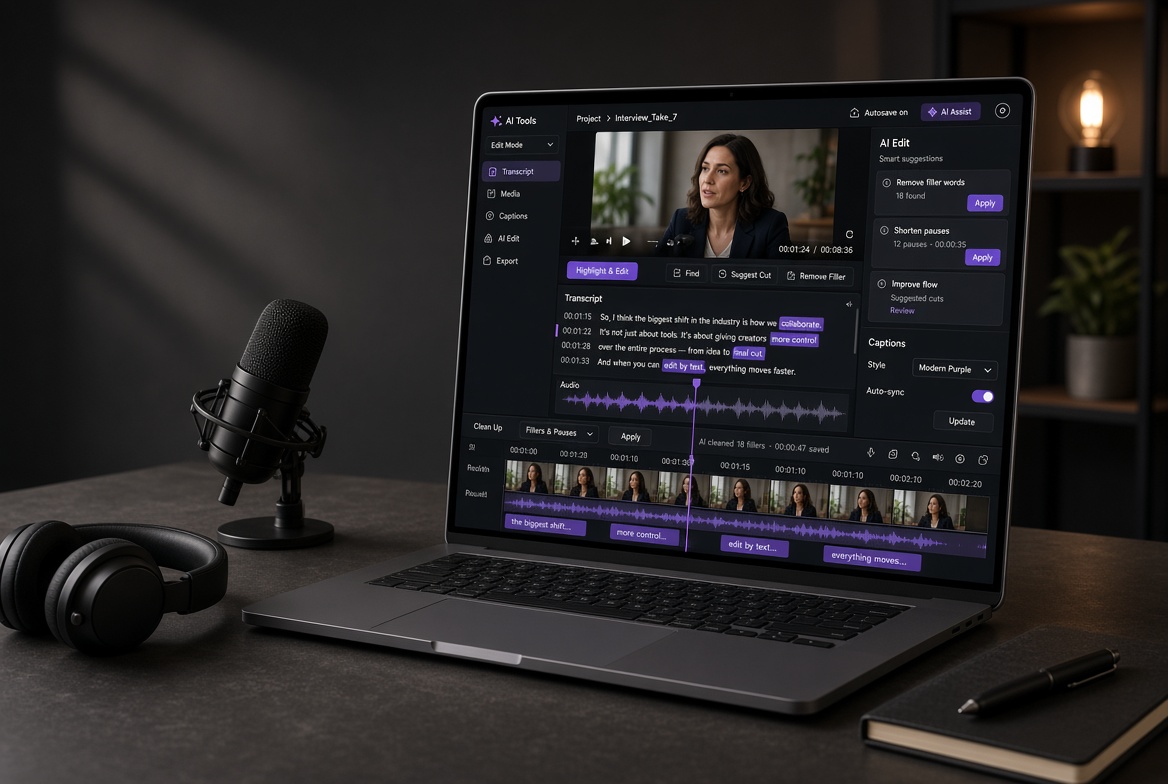
Instead of treating your recording purely as a video timeline, it turns the spoken content into text. You can then edit the transcript and make corresponding changes to the recording.
- That sounds simple.
- And honestly, that's the point.
So in this Descript Review 2026, we're looking at the question that actually matters: does editing video like a document genuinely make content production easier?
For podcasters, YouTubers, marketers, educators, and businesses that create a lot of spoken-word content, the answer can be surprisingly close to yes.
What Is Descript?
Descript is an AI-powered video and audio editing platform built around transcription and text-based editing.
You can record or import content, generate a transcript, and then work with that transcript alongside the video and audio.
Delete a sentence from the transcript, and the corresponding section of the recording can be removed.
That changes the editing experience completely.
Instead of constantly searching through a timeline for the exact moment someone said something, you can find the words and edit them directly.
For interviews, podcasts, tutorials, presentations, and talking-head videos, that's a very useful idea.
Why Descript Feels Different ?
The biggest reason to try Descript isn't simply its AI.
- It's the workflow.
Imagine recording a 30-minute tutorial and realizing you repeated yourself three times.
With a traditional editor, you'd scrub through the timeline, find each section, cut it, adjust the surrounding clips, and clean up the audio.
With Descript, you can find those sentences in the transcript and remove them directly.
That's where the platform starts saving real time.
And when you're producing content every week, saving small amounts of editing time adds up quickly.
The Transcript Is the Real Feature
Descript's transcript-based editing is the feature I'd pay attention to first.
The platform turns spoken content into editable text and connects that text to the underlying recording.
This makes common tasks much easier:
Remove unwanted sentences
Cut pauses and mistakes
Rearrange spoken sections
Find specific parts of a recording
Create clips from longer recordings
Generate captions
Clean up spoken content
It's particularly useful when what people say matters more than complicated visual effects.
- That's an important distinction.
Descript isn't interesting because it magically makes every type of video easier.
It's interesting because it makes a specific type of editing dramatically more intuitive.
AI Does More of the Boring Work
Descript also includes AI-powered features designed to speed up repetitive content-production tasks.
Depending on your workflow, this can reduce the amount of manual editing involved in cleaning recordings, preparing clips, working with transcripts, and producing variations of content.
That's useful because editing isn't always about creativity.
A lot of it is cleanup.
Removing mistakes. Finding clips. Fixing awkward sections. Preparing captions. Turning one recording into multiple pieces of content.
Those are exactly the areas where automation can save time.
Great for Podcasts, Tutorials and Talking-Head Content
This is where I think Descript makes the most sense.
Podcasts
You can work from the transcript instead of relying entirely on an audio timeline.
YouTube videos
Talking-head videos, interviews, tutorials, and educational content fit naturally into the workflow.
Screen recordings
If you're recording software tutorials or demonstrations, being able to search and edit the spoken explanation through text is extremely convenient.
Business content
Marketing teams and businesses can use the platform for presentations, training videos, internal communication, interviews, and other recurring content.
The common thread is simple:
There's a lot of talking.
That's where Descript earns its keep.
Descript Pricing :
Descript offers a free option alongside paid plans.
The exact limits and pricing depend on the current plan structure, including factors such as transcription, media usage, AI capabilities, and export requirements.
| Plan | Best for | Main consideration |
|---|---|---|
| Free | Trying Descript | Limited usage and exports |
| Creator | Individual creators | More usage and production capabilities |
| Pro | Serious creators and professionals | Higher limits and advanced capabilities |
| Business | Teams | Collaboration and larger production workflows |
Before subscribing, check the current Descript pricing page because AI credits, transcription allowances, media limits, and other plan restrictions can change.
Who Should Buy Descript?
I'd seriously consider Descript if you:
Publish videos regularly
Run a podcast
Create tutorials
Produce talking-head content
Make screen recordings
Create educational videos
Need captions and transcripts
Turn long videos into shorter clips
Work with a content team
Hate spending hours cleaning up timelines
The more frequently you create spoken-word content, the more compelling Descript becomes.
Is Descript Worth It in 2026?
Yes — if your content is built around people talking.
That's the real buying decision.
Descript isn't trying to make every kind of video editing disappear.
Instead, it takes one particularly frustrating part of content creation — editing spoken audio and video — and makes it behave more like editing a document.
For a podcaster, YouTuber, educator, marketer, or business creating regular talking-head content, that can be a big productivity improvement.
The free plan is a sensible way to understand the workflow before paying.
But if you create content regularly and find yourself spending hours searching through timelines for words that were already spoken, Descript is absolutely worth trying.
My recommendation -
Start with the free plan.
If the transcript-based workflow immediately feels faster than your current editing process, move to a paid plan based on how much content you produce.
Don't buy Descript because it has AI.
Buy it because it can make your actual editing workflow faster.
Try Descript →
Try Descript →-----------
Disclosure: SaaSNivo may earn a commission if you purchase Descript through our affiliate link, at no additional cost to you. Our recommendations are based on the product's features, value, and suitability for different users.
Featured in this article
 Editor’s choice
Descript
FreemiumDescript's transcript-based editing turns video editing into something closer to word processing.Descript's transcript-based editing turns video editing into something closer to word processing.